


MP Bhulekh Land Records
MP Bhulekh is the Madhya Pradesh government's official online portal for viewing and downloading land records such as Khasra, Khatauni, and B1, along with village land maps. You can check ownership, soil type, irrigation, and crop details for a plot, and apply for mutation, without visiting a tehsil office.
How to View Land Record Khasra/Khatoni/Map in Madhya Pradesh
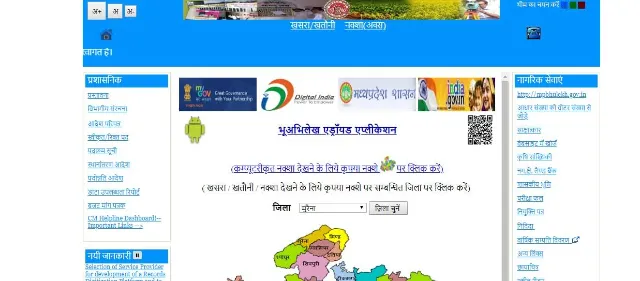
To view the land record Khasra or Khatoni or Map in Madhya Pradesh, follow the below steps:
- Step 1: Visit MP land record official site
- Step 2: Choose the relevant district and then you'll have to select the Tehsil to view the required information.
- Step 3: Now select 'Choose' to view the details.
- Step 4: Choose the option: Khasra/map, or Khatoni, or field report, or type of land, or land records, or crop details, or list of official Khasra numbers, or list of account holders.
- Step 5: If you have selected 'Naksha/map', upon submitting, you'll be directed to choose the Khasra number.
- Step 6: Here you can either select to view Khasra by number, or Khasra of the account, or Khasra map.
- To Check Naksha by Name Online in MP: select 'Naksha/Map' to view the map of the property.
- To Check Map/Bhunaksha of a Property in MP Visit MP Bhulekh. Select the district, tehsil, RI, halka, and the village, and then you'll be able to view the map.
How to Check Property Related Documents Online in MP Bhulekh
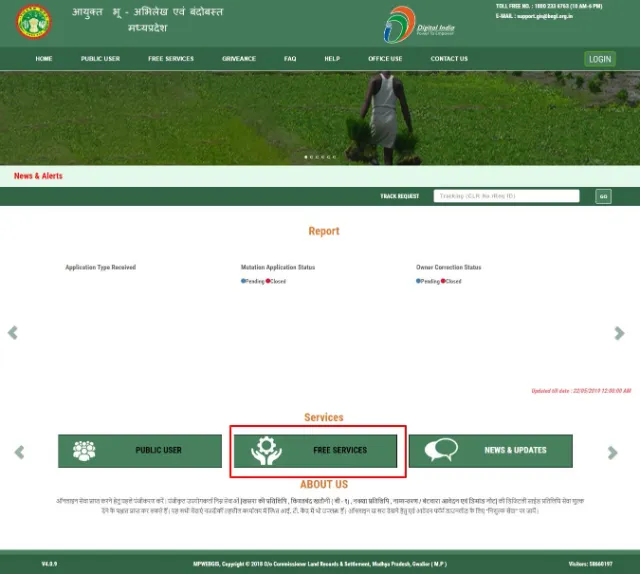
To check other property document details online, follow the below steps:
Step 1: Visit the official MP Bhulekh site.
Step 2: Select the required document to view information of the same. You can check documents such as Khasra/B-1/Map copy or information pertaining to the application form, crop details report, land type report, village list, area related report, Govt. Khasra report, Tehsil wise land use summary report, etc.
How to Check Property-Related Documents in MP Bhulekh Online?
You can check the documents related to your property in MP Bhulekh Online by following the steps mentioned below:
- Visit the official website of MP Bhulekh.
- Navigate to the 'Free Services' tab from the menu.
- Select the option with Khasra, B1, or Map.
- Fill out the necessary information as per requirement - such as zilla, village, tehsil, and so on.
- Select the option with the name of the document that you would like to view from the list - such as khata number, khasra number, etc.
- Click on the 'Submit' button.
- The document that you want to view will be displayed on your screen after the submission of the form.
Mutation (Naamantaran) of Land Records in MP Bhulekh
Mutation, or Naamantaran, updates the Khasra and Khatauni to show a change in land ownership. For property that is freshly registered at the Sub-Registrar's office, Madhya Pradesh's Cyber Tehsil system triggers this update automatically, so you do not need a separate application. For other changes, such as inheritance, partition, or a government patta, you can apply for mutation on MP Bhulekh and track the request with the acknowledgment number you receive.
How Can I Track My Request or Transaction Status?
You can follow the steps mentioned below to track the status of a request or a transaction:
- Visit the official website of MP Bhulekh.
- Navigate to the 'Track Status' option from the home page.
- Enter the acknowledgment number in the designated field.
- Click on the 'Submit' button to view the status.
Find Land Records in Other States
Schemes and Acts
- Pradhan Mantri Awas Yojana - Urban - PMAY(U)
- Pradhan Mantri Awas Yojana Gramin Online (PMAYG)
- Pradhan Mantri Awas Yojana - Urban 2026
- Real Estate (Regulation and Development) Act, 2016
- Stamp Duty and Registration Charges 2026
- Encumbrance Certificate (EC)
- Delhi Development Authority (DDA) Housing Scheme
- Land Records 2026
FAQs on MP Bhulekh Land Record
1.What is MP Bhulekh?
MP Bhulekh is Madhya Pradesh's official online portal for accessing land records such as Khasra, Khatauni, and B1. It lets you view ownership, soil, and crop details for a plot without visiting the local tehsil office.
2.What is Khasra in MP Bhulekh records?
Khasra is a field-wise land record available on MP Bhulekh that lists a plot's survey number, area, land revenue, irrigation source, and crop details. It is one of the core documents you can view and download on the portal.
3.How do I view Khasra or Khatauni details on MP Bhulekh?
On MP Bhulekh, choose the Khasra or Khatauni option and select your district, tehsil, and village to view the record. Registration is not needed simply to view these details online.
4.What is B1 Khatauni on MP Bhulekh?
B1 Khatauni is a Madhya Pradesh land record extract on MP Bhulekh that shows account-holder-wise ownership and tenancy details for a Khasra. You can view or download a B1 copy the same way as a Khasra.
5.How can I check a land map (Naksha) on MP Bhulekh?
MP Bhulekh lets you view a village or plot map, called Naksha or Bhunaksha, after you select the district, tehsil, RI circle, halka, and village. This map shows the shape and boundaries of the land parcel.
6.What is Mutation in MP Bhulekh land records?
Mutation, or Naamantaran, is the process of updating the Khasra and Khatauni on MP Bhulekh to reflect a change in land ownership. It typically follows a sale, inheritance, or gift of the property.
7.What are the common reasons for a Mutation on MP Bhulekh?
A Mutation on MP Bhulekh can follow a sale or purchase, a government patta, a gift, inheritance through a will or succession, a court decree, government land acquisition, a lease, an auction, or the owner's death. Each type of change calls for different supporting documents when you apply.
8.What documents are needed for Mutation on MP Bhulekh?
The documents needed for a Mutation on MP Bhulekh depend on how the ownership changed, but commonly include the B1 and Khasra copies, the sale deed or will, a court decree where applicable, and the Bhu-Adhikar evam Rin Pustika. A death certificate is needed where the Mutation follows the owner's death.
9.Does MP Bhulekh charge a fee for Mutation?
MP Bhulekh does not currently charge a fee for processing a standard land Mutation. It is still worth checking the current terms on the portal when you submit your application.
10. How do I apply for Mutation on MP Bhulekh?
You can apply for Mutation on MP Bhulekh by registering on the portal and selecting your district, tehsil, RI circle, halka, and Khasra number, or by submitting a written request at your local IT centre. Either way, you receive a Request ID to track the application.
11.How do I register an account on MP Bhulekh?
To register on MP Bhulekh, choose the account registration option and enter the requested details, after which your login password is sent to you. Registration is only needed for services like applying for Mutation, not for simply viewing Khasra or Khatauni details.
12.How can I track my MP Bhulekh application status?
You can track an MP Bhulekh application by entering your acknowledgment or Request ID on the portal's status page, or by providing it at your local IT centre. This works for both document requests and Mutation applications.

Karishma VP has over a decade of experience in content writing which includes over five years specializing in personal finance. Her career in BankBazaar has given her the opportunity to write on a wide variety of financial products ranging from credit cards and home loans to insurance policies and government schemes. She believes that an understanding of personal finance is an important step to leading an independent, empowered life. This has led to her being passionate about learning more about the BFSI sector and writing about personal finance as clearly, concisely, and accurately as possible to make it accessible to a larger audience through BankBazaar.

Disclaimer
Credit Card:
Credit Score:
Personal Loan:
Home Loan:
Fixed Deposit:


Copyright © 2026 BankBazaar.com.